
Progresify
A goal-driven people platform I designed and built solo, connecting OKRs, structured 1:1s, and performance reviews to real engineering output so reviews are grounded in evidence rather than memory.
Summary
A goal-driven people platform I designed and built solo, connecting OKRs, structured 1:1s, and performance reviews to real engineering output so reviews are grounded in evidence rather than memory.
- 8Weeks to MVP
- 30+API endpoints
- 6Disciplines owned
- 8Daily active users
The Problem
Across three engineering leadership roles at Medli, HelloFresh, and Betica, the same problem surfaced at every review cycle. Neither I nor my reports could confidently reconstruct what had been delivered in the previous six months. OKRs lived in spreadsheets. 1:1 notes scattered across Google Docs. Engineering output sat in GitHub, Jira, and Linear, entirely disconnected from the goals they were supposed to serve. Every review came down to memory, and memory is biased.
I looked seriously at Lattice, Personio, Workday, DarwinBox, 15Five, Leapsome, and Small Improvements. Most solve adjacent problems: payroll, compliance, engagement surveys. The few that tackle OKRs don't close the loop to actual engineering output. Nobody was solving the core problem: evidence should be gathered continuously, not recalled under pressure.
The Approach
I built Progresify solo. Product definition, Figma design, frontend, Go backend, PostgreSQL schema, DevOps, and go-to-market all fell to me. The backend runs on Go with a strict Hexagonal Architecture, keeping domain logic isolated from infrastructure. The hardest engineering challenge was multi-tenant RBAC: every query scopes data across three permission levels (own / reporting_line / all), enforced by a Casbin-inspired rule engine at the query level, with CASL-style capability guards on the frontend that never render unauthorised actions.
The frontend was genuinely new territory. I came from backend and infrastructure. Learning Next.js 16 App Router, Tailwind CSS 4, shadcn/UI composition, and Figma in parallel was the steepest part of the build.
The Outcome
Shipped a production-grade MVP in 8 weeks of focused development, covering the full performance management loop: OKRs with three key result types, structured 1:1 meeting series with carry-forward action items, role-differentiated dashboards, a real-time inbox powered by domain events, and RBAC across all modules. In early access at one company with 8 people using it daily for goal tracking and 1:1s.
If you're managing an engineering team and tired of guessing at review time, join the waitlist for early access.
Two Constraints I Wouldn't Compromise On
Before writing a line of code, I settled on two principles that shape every product decision in Progresify:
Evidence must be automatic. If a manager has to manually add context to a goal after a sprint, they won't. The platform needs to pull GitHub PRs, Jira tickets, and Linear issues and associate them with the right objective without asking anyone to update a field. The integration does the work; the human does the thinking.
The manager still writes the review. Progresify surfaces data. It does not generate reviews. This is a deliberate stance against AI-written performance assessments, which I think erode the trust that structured 1:1s are supposed to build. The manager should know why they gave a rating. "The model summarised it" isn't a reason.
From those two constraints I defined the feature set in modules: Goals & OKRs, structured 1:1 Meetings, People Directory, Inbox, Dashboards, and RBAC configuration. Then I opened Figma, which I had not used seriously before, and designed the entire interface before writing a line of frontend code.
Architecture Decisions
Go with Hexagonal Architecture
The backend is Go, structured around Hexagonal Architecture (ports and adapters). Every external concern connects through a defined port interface: PostgreSQL, Redis, Supabase, and the planned GitHub/Jira/Linear integrations. The domain layer has zero direct infrastructure dependencies. This made it straightforward to test domain logic in isolation and to swap or add adapters as the product grew.
Multi-Tenant RBAC
This was the genuinely hard engineering problem. Progresify supports three permission scopes per resource-action pair:
- own: you can act only on your own data
- reporting_line: you can act on data belonging to anyone in your org subtree
- all: unrestricted within the workspace
These scopes stack with custom roles that workspace admins define per installation. Enforcing this at the query level, not just as UI conditionals, meant building a rule engine before any of the product features. Every database query carries the scope context. Nothing leaks across tenant boundaries.
The frontend mirrors this with CASL-inspired capability guards. If you don't have permission to see an action, it isn't rendered. Not disabled. Not hidden with CSS. Not rendered at all.
Domain Events for the Inbox
Cross-module notifications (goal comments, overdue action items, upcoming 1:1s) are powered by domain events rather than direct module coupling. When the meetings module emits an "action item overdue" event, the inbox module picks it up independently. Modules don't know about each other.
Monorepo with Turborepo
The frontend is a Turborepo monorepo with shared packages: @progresify/ui (shadcn component library), @progresify/capabilities (CASL-inspired permission guards), @progresify/hooks (shared React hooks), and @progresify/blocks (composite UI blocks). Sharing these across the app and the landing page kept the design system consistent without duplication.
Building as One Person
Product, Figma, frontend, backend, schema design, Redis, Supabase auth setup, CI/CD, landing page, SEO, copy: all of it was mine to sort out. I had shipped backend services and infrastructure at scale before. I had never written a production Next.js application, configured Tailwind properly, or designed a UI from scratch in Figma.
The learning curve on the frontend was real and slower than I expected. Next.js 16 App Router has a different mental model from anything I had used before. Tailwind CSS 4's cascade layer approach was new. Getting shadcn/UI component composition right took longer than the docs suggest. Motion animations that feel polished rather than busy are genuinely difficult to calibrate.
I used Claude and Cursor throughout the build: for exploring architecture trade-offs, generating typed API clients from OpenAPI specs, reviewing Go interface designs, and catching edge cases in permission logic. The tooling meant I could hold a proper conversation about a design decision rather than just searching for an answer. The decisions were still mine. The consequences are still mine.
Eight weeks of focused development later, built alongside full-time employment, the core loop was live.
What Shipped
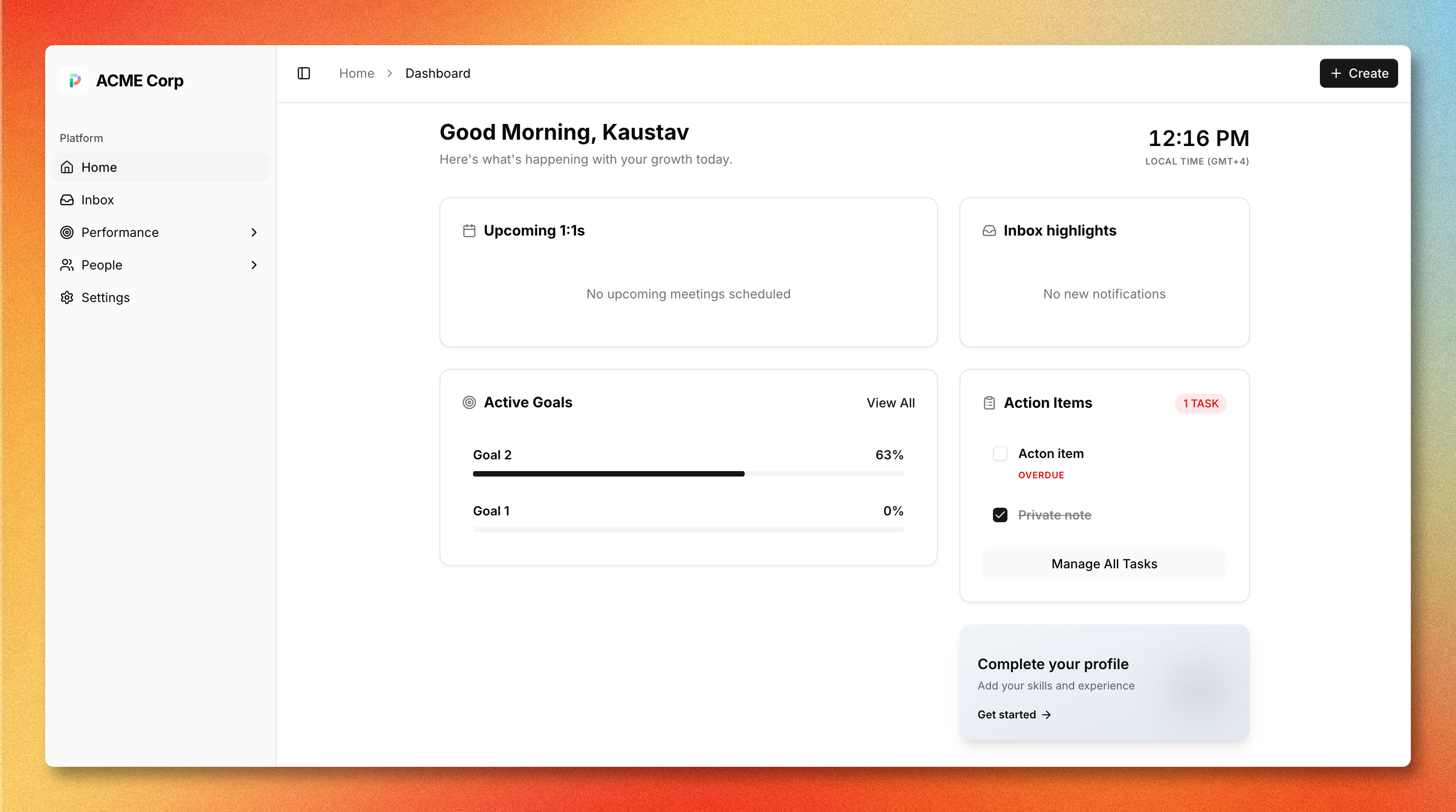
The MVP covers the full performance management workflow:
Goals & OKRs
Three key result types: numeric (absolute), percentage (0–100%), and milestone (binary), with real-time progress computation. Goal cycles can be scoped to the company, a team, or an individual. Comments thread directly on objectives and key results for async alignment without leaving the platform.
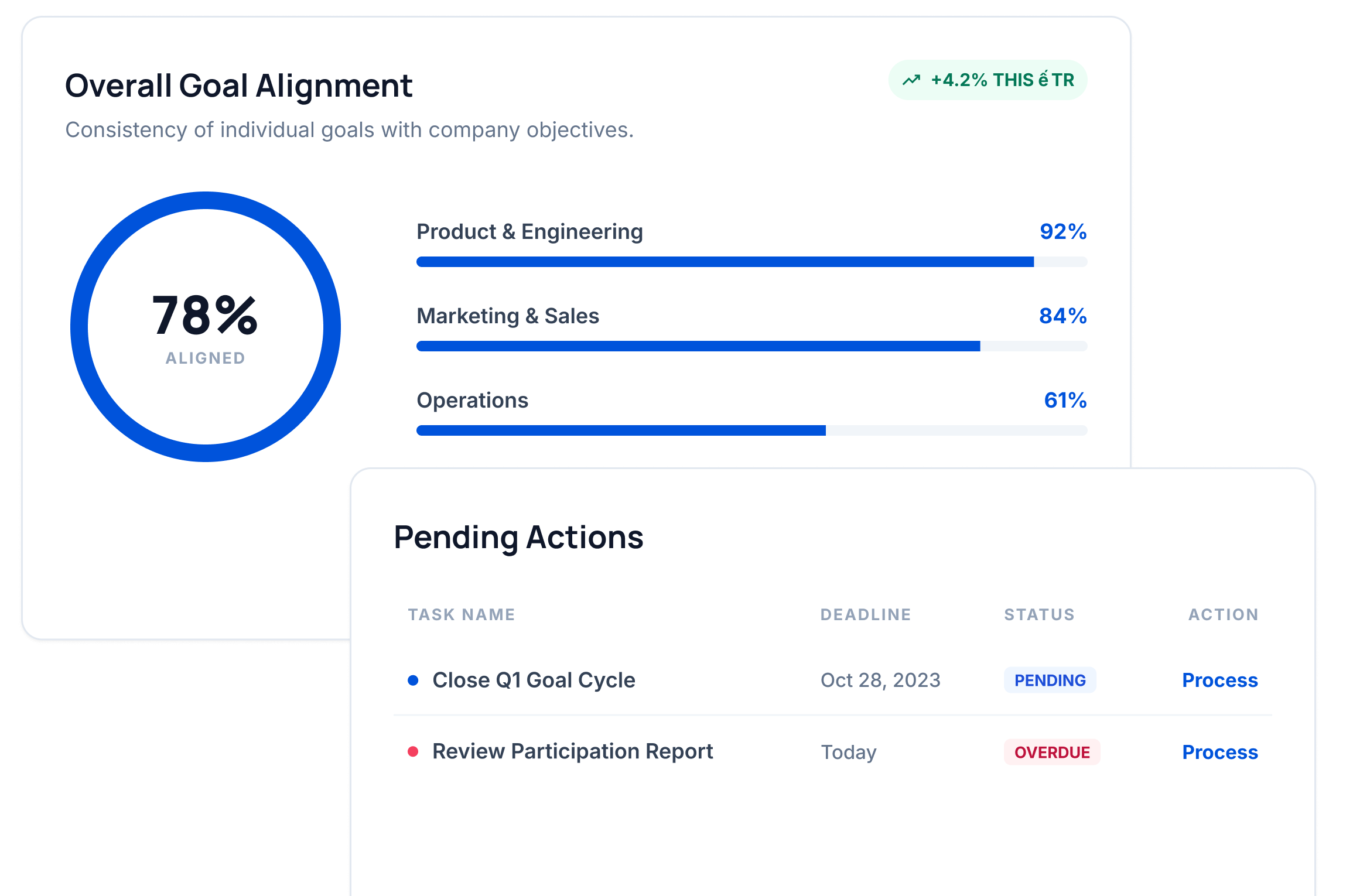
The goal analytics widget surfaces overall alignment scores, per-team completion breakdowns, and pending action items in a single view. The kind of at-a-glance overview a manager needs before a weekly team meeting.
Structured 1:1 Meetings
Collaborative agendas with shared and private note sections. Action items carry forward between sessions so nothing falls through the cracks. A calendar view shows meeting cadence per manager-report pair; the meeting velocity metric tracks how consistently 1:1s are actually happening.
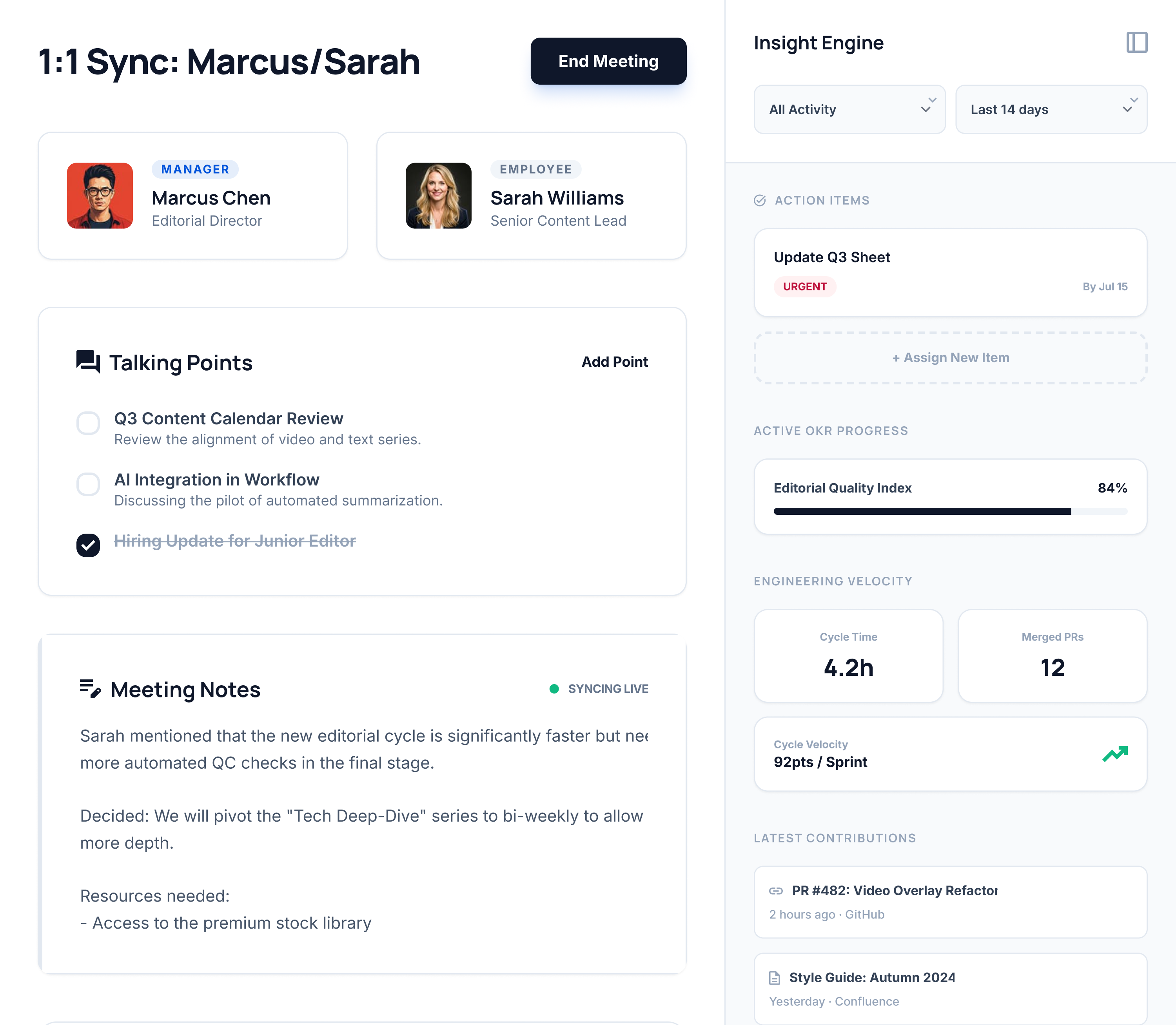
The Insight Engine panel (right side) is where the evidence-linking story comes together. It surfaces active OKR progress, engineering velocity (cycle time, merged PRs, velocity points), and latest contributions from GitHub and Confluence, all visible inside the 1:1 itself rather than in a separate admin report.
Platform-Wide
- Role-differentiated dashboards: different post-login views for admin, manager, and employee roles showing active goals, pending action items, and upcoming meetings
- Real-time inbox: per-user notification feed powered by domain events from across the platform
- People directory and org chart: filterable employee directory, interactive reporting hierarchy, and tabbed employee profiles
- Fine-grained RBAC: custom roles with per-resource scope permissions, enforced at the query level throughout
Impact
- 8Weeks to MVP
- 30+API endpoints
- 6Disciplines owned
- 8Daily active users
Learnings
- 01
Design multi-tenant RBAC before the first feature. Retrofitting scope rules into an existing schema is expensive.
- 02
Owning the full stack eliminates coordination overhead, but the learning curve on unfamiliar layers is real and should not be underestimated.
- 03
AI tooling (Claude, Cursor) accelerates exploration and boilerplate. The architecture decisions still need a human who will live with the consequences.
Got something to build?
Drop me a line or book a short call. Replies are usually back the same day.
Let's talk →